
How to Use Cell Decorator and Translator in SAP Hybris Impex
If you’ve already explored Impex in SAP Commerce (Hybris), you know it’s a powerful tool for importing and exporting data. However, in real-world scenarios, the incoming data is rarely in the exact format the system expects. Often, you need to refine, enrich, or transform the data during the import process. This is where Cell Decorator and Translator in SAP Hybris come into play.
They act as a bridge between raw input data and the structured format required by Hybris, making your Impex scripts more robust, flexible, and production-ready.
Many developers often get confused between Cell Decorator and Translator. This blog will help you clearly understand what exactly they are and when to use each.
What is a Cell Decorator?
In SAP Hybris Impex, a Cell Decorator modifies a value after Impex reads it but before it converts or saves it. It gives you a chance to apply custom logic – like cleaning, formatting, or enriching the data – without changing the original file.
In simple terms, when Impex picks a value from a column, the cell decorator steps in and lets you adjust that value. After that, Impex passes the updated value to the translator or saves it in the system.
In Hybris, the CSVCellDecorator interface lets you control and adjust data while Impex processes it. Its decorate() method gives you both the column position and the full row data, so you can easily modify values based on the complete context.
How decorator works internally
- Impex reads a row from the file
- For each column, it fetches the raw string value
- If a decorator is configured, the decorate() method is executed
- Impex then passes the modified value to the translator (if configured)
- Finally, Impex saves the processed value into the system.
Why to use Cell decorator
In real-world projects, incoming data is often inconsistent or not aligned with system standards. Instead of modifying source files, decorators allow you to handle such scenarios directly in Impex.
Common Use Cases:
- Adding prefixes/suffixes (e.g., PROD_123)
- Trimming spaces or cleaning data
- Converting values (e.g., lowercase → uppercase)
- Default value handling (if value is null/empty)
- Conditional transformation based on other column values
Cell Decorator Implementation with Practical example:
In this scenario, we use a Cell Decorator to convert the electronicName into uppercase, ensuring consistent formatting during data import.
STEP 1: Create a Java class that implements the CSVCellDecorator interface
public class LaptopCodeDecorator implements CSVCellDecorator
{
    @Override
    public String decorate(int position, Map<Integer, String> srcLine)
    {
        String value = srcLine.get(position);
        if (value == null)
        {
            return null;
        }
        return value.trim().toUpperCase();
    }
}
STEP 2: Assign the above class path as a decorator to the required attribute in the Impex.
INSERT_UPDATE Laptop; electronicId[unique=true]; electronicName[decorator=com.electronic.decorator.LaptopCodeDecorator]
;LP1001; macbook pro 14
What is a Translator?
A Translator in SAP Hybris Impex is responsible for converting the processed string value into the actual object, model, or data type required by the system. While a Cell Decorator prepares or formats the raw data, the translator performs the core transformation that determines how the system interprets and stores the value.
In simple terms, once Impex reads and optionally cleans the data, the translator converts it into a meaningful form – like mapping a code to an item, enum, or date format. To create a custom translator, you typically write a class that extends AbstractValueTranslator or implements ValueTranslator, where you define the conversion logic.
How translator works internally
- Impex reads the raw value
- Cell Decorator (if configured) modifies the value
- The Translator’s importValue() method is executed
- The translator converts the value into a model object, enum, or primitive type.
- Impex assigns the converted value to the attribute and persists it.
During export:
- The exportValue() method converts the object back into a string
Why to use Translator
In enterprise projects, teams often represent data in simple formats (like strings), but Hybris requires structured objects. Translators help bridge this gap by converting raw values into meaningful system entities.
Common Use Cases:
- Converting string to model objects (e.g., Brand, Category)
- Handling enum values
- Parsing custom formats (dates, JSON, codes)
- Managing relations (one-to-many, many-to-many)
- Validating and transforming business-specific data
Translator Implementation with Practical example:
In this scenario, a Translator converts the yes/no values of dedicatedGPU into true/false so the system stores the data correctly.
STEP 1: Create a Java class by extending the AbstractValueTranslator class
public class YesNoToBooleanTranslator extends AbstractValueTranslator
{
    @Override
    public Object importValue(String value, Item item)
    {
        if (value == null)
        {
            return null;
        }
        return "yes".equalsIgnoreCase(value) || "y".equalsIgnoreCase(value);
    }
    @Override
    public String exportValue(Object value)
    {
        return value != null ? value.toString() : "false";
    }
}
STEP 2: Assign the above class path as a translator to the required attribute in the Impex.
INSERT_UPDATE Laptop; electronicId[unique=true]; dedicatedGPU[translator=com.electronic.translator.YesNoToBooleanTranslator]
; LP002 ; yes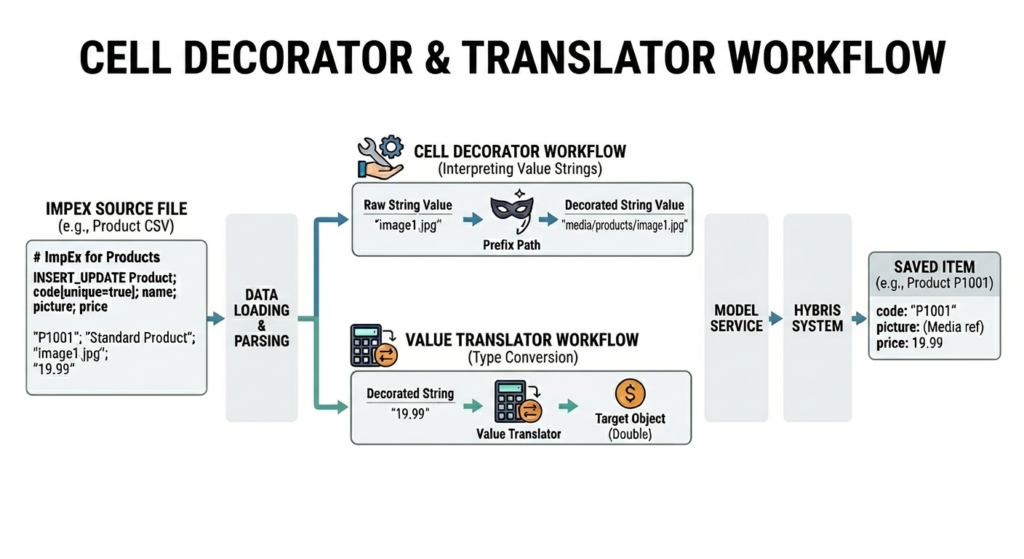
Cell Decorator vs Translator
| Feature | Cell Decorator | Translator |
| Primary Goal | Modify the input string. | Convert string to Object (and back) |
| Complexity | Simple string manipulation | Complex business logic/DB lookups |
| Output | A modified String | A Java Object (ItemModel, etc.) |
| Interface | CSVCellDecorator | ValueTranslator |
| Sequence | Runs before the translator | Runs after the decorator |
If you’re working with Impex regularly, combining these techniques can significantly improve your data import strategy.