
SAP Hybris Extension
SAP Commerce uses a highly modular architecture. At the heart of this modularity lies a powerful concept called extension. If you are working on an SAP Commerce project, understanding extensions is absolutely essential.
What is an extension
- An Extension is a self-contained functional module that adds specific features or capabilities or functionalities.
- Extensions can contain business logic, type definitions, localizations, external library files, a web application, backoffice configuration functionality.
- We can create custom extensions based on business requirements by using existing extensions.
- We can have any number of extensions in one commerce project.
- SAP Commerce implements each platform feature – products, carts, promotions, backoffice, and APIs—through extensions.
Why does SAP Commerce use extensions
Extensions help to achieve:
- Modularity: This approach isolates each feature, making the system easier to understand and maintain.
- Reusability: We can reuse extensions across multiple projects.
- Easy Customization: Custom logic can be added without modifying core SAP code.
- Better upgrade: Since custom code lives in separate extensions, platform upgrades are safer.
Extension Structure
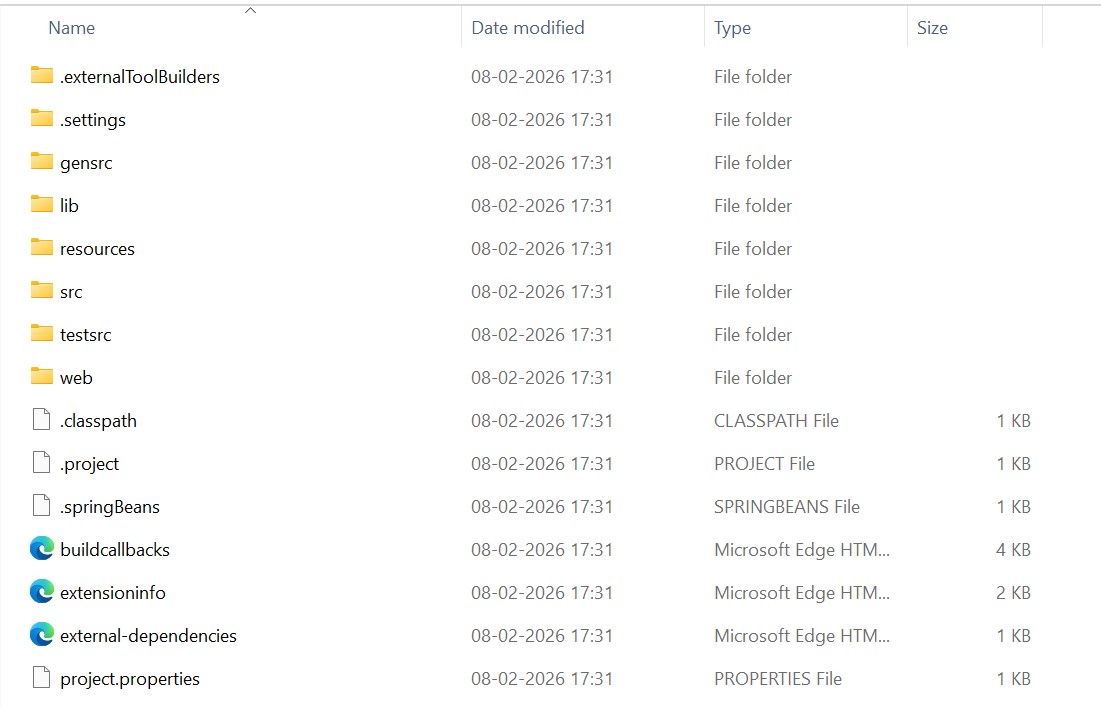
Important files in extensions:
- resources: This folder is the heart of configuration. It contains configuration and non-java source files. It contains items.xml, spring.xml and beans.xml files.
- src: This folder contains java source code which contains business logic implementation. It includes services, DAOs, facades, event listeners, etc. files. This folder is mostly used by developers.
- lib: This folder contains third-party jars which are extension specific dependencies and not available in platform
- testsrc: This folder holds unit and integration test cases for testing services and DAOs. Uses JUnit and Mockito.
- web: Contains web-layers components which includes controllers, JSPs, Spring MVC configuration. Used in storefront and web services extensions.
- extensioninfo.xml: This file is mandatory for enabling this extension. This is the core metadata file for the extension which defines extension name and dependencies.
- buildcallbacks.xml: This file supports pre-build and post-build actions, used to hook custom logic into ant build lifecycle.
- external-dependencies.xml: This file manages external dependencies for the extension. It is alternative to placing jar in lib/
- project.properties: This file holds extensions-specific configuration properties which are loaded during build and runtime.
How to Create Custom Extension
- Navigate to the platform folder in the command prompt. Set ant env. Command: setantenv.bat
- ant extgen: this command is used to create single extension using the ootb templates of extensions.
Run ant extgen command
ant extgen
- You need to give template name, extension name and package name

- After successfully creating extension, we need to add the extension name in localextensions.xml file

- Do build.
- If the extension contains items.xml file then update the system.
- Start server