
Mastering Classification System in SAP Commerce: End-to-End Guide
In SAP Hybris (SAP Commerce), managing product data efficiently is very important, especially when you are dealing with large catalogs that have different types of products. Each product may require different attributes. If we try to manage all these attributes using the standard data model (items.xml), it quickly becomes complex and difficult to maintain. Every small change would require code updates and system deployment.
This is where the SAP Hybris Classification System becomes very useful.
The Classification System allows you to create and manage product attributes dynamically without changing the core data model. It helps you organize attributes in a structured way and assign them to products based on categories, making your system more flexible, scalable, and easy to manage.
In this blog, we will understand how the Classification System works, why it is important, and how it is used in real-world SAP Hybris projects.
Why we need Classification
Let’s understand this with real world example:
Imagine you are working on an e-commerce website like Amazon that sells multiple types of products such as mobiles, laptops, and clothing.
Each product type has completely different attributes:
- Mobile Phones -> RAM, Storage, Battery, Camera
- Laptops -> Processor, RAM, Screen Size, Operating System
- Clothing -> Size, Color, Fabric, Fit
Now, if you try to manage all these attributes using items.xml, you would have to keep adding new fields every time a new product type or attribute is introduced. This would require code changes, system updates, and deployments – which is not practical for a fast-growing business.
Instead, using the Classification System:
- You create classification classes like Mobile, Laptop, Clothing
- Define relevant attributes for each class
- Assign these classes to products via categories
This makes the system:
- More flexible
- Easier to maintain
- Faster to adapt to business changes
That’s why most real-world SAP Commerce projects rely heavily on the Classification System for managing dynamic product attributes.
Key Components of Classification System
You can create classification system components via backoffice or through impex. Below I’ll explain each component and show you how to create it using impex. To know more about impex, refer impex.
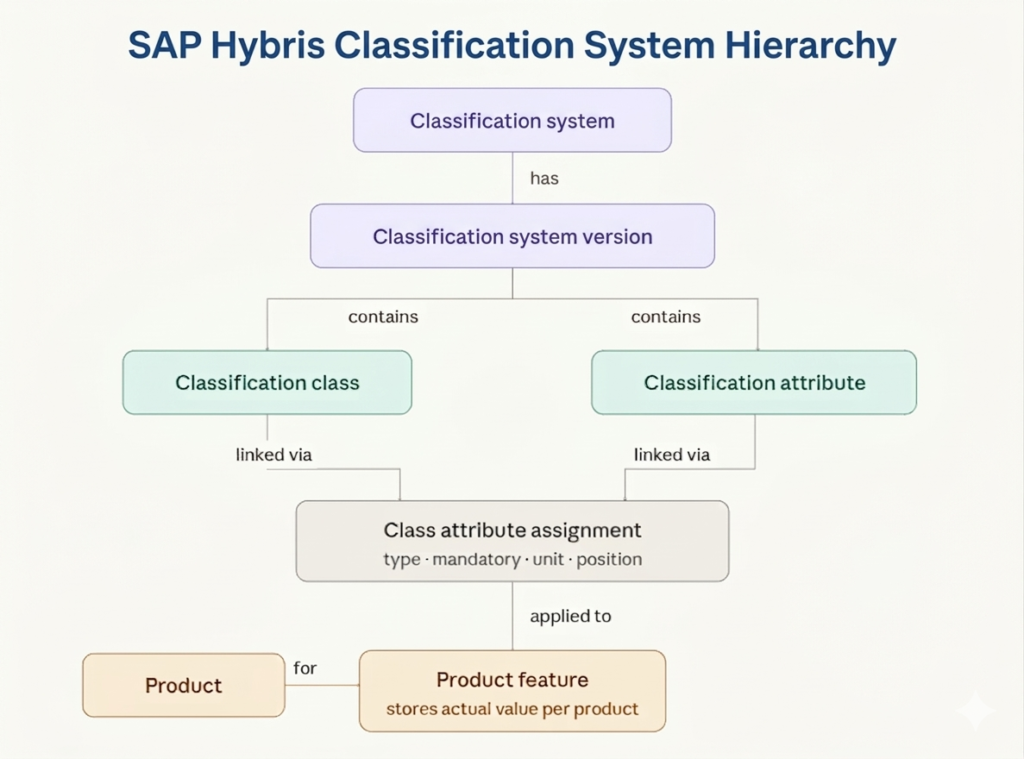
ClassificationSystem: This is the top-level container that holds everything related to classification. It acts like a separate structure parallel to your product catalog.
INSERT_UPDATE ClassificationSystem; id[unique = true] ; name[lang = en]
              ;ElectronicsClassification; Electronics Classification
ClassificationSystemVersion: Every classification system has versions, just like product catalogs.
INSERT_UPDATE ClassificationSystemVersion; catalog(id)[unique = true]; version[unique = true]
              ; ElectronicsClassification    ; 1.0
ClassificationClass: A classification class defines a group of attributes. You assign classification classes to products via categories.
INSERT_UPDATE ClassificationClass; code[unique = true]; name[lang = en]; $catalogVersion[unique = true, allowNull = true]
              ; Mobile; Mobile; ElectronicsClassification:1.0
              ; Laptop; Laptop; ElectronicsClassification:1.0
              ; Clothing; Clothing; ElectronicsClassification:1.0
ClassificationAttribute: These are the actual attributes you want to define.
INSERT_UPDATE ClassificationAttribute; code[unique = true]; systemVersion(catalog(id), version)
              ; RAM       ; ElectronicsClassification:1.0
              ; Processor ; ElectronicsClassification:1.0
			  ; Size      ; ElectronicsClassification:1.0
ClassificationAttributeValue: These are the actual values of your attributes
INSERT_UPDATE ClassificationAttributeValue; code[unique = true]; name[lang = en]; systemVersion(catalog(id), version)
               ; 8GB       ; 8GB  ; ElectronicsClassification:1.0
			   ; 16GB      ; 16GB ; ElectronicsClassification:1.0
			   ; M         ; M    ; ElectronicsClassification:1.0
			   ; L         ; L    ;ElectronicsClassification:1.0
ClassAttributeAssignment: This is the link between a class and an attribute. This is where you set whether an attribute is mandatory, its display order, and any default value.
INSERT_UPDATE ClassAttributeAssignment; classificationClass(code)[unique = true]; classificationAttribute(code)[unique = true]; attributeType(code); position; attributeValues(code, systemVersion(catalog(id), version))[default='ElectronicsClassification:1.0']; unit(code)
              ; Mobile ; RAM      ; enum  ; 1 ;                  8GB:ElectronicsClassification:1.0, 16GB:ElectronicsClassification:1.0
			  ; Laptop ; Processor; enum  ; 2 ; i3:ElectronicsClassification:1.0
			  ; Clothing; Size    ; enum  ; 3 ; M:ElectronicsClassification:1.0, L:ElectronicsClassification:1.0
ProductFeature: Set actual values per product per attribute. Example, Product “300046033” has Size= M” This is what customers see.
$catalogVersion=catalogVersion(catalog(id), version)
INSERT_UPDATE ProductFeature; product(code,$catalogVersion)[unique=true]; qualifier; classificationAttributeAssignment(classificationClass(code,$catalogVersion),classificationAttribute(code,systemVersion(catalog(id),version)),systemVersion(catalog(id),version))[unique=true]; value             ; valuePosition
			 ;300046033:apparelProductCatalog:Staged;Size; Clothing:ElectronicsClassification:1.0:Size:ElectronicsClassification:1.0:ElectronicsClassification:1.0; M:ElectronicsClassification:1.0; 0
To assign classification attributes, first we need to add ClassificationClass in product supercategories.
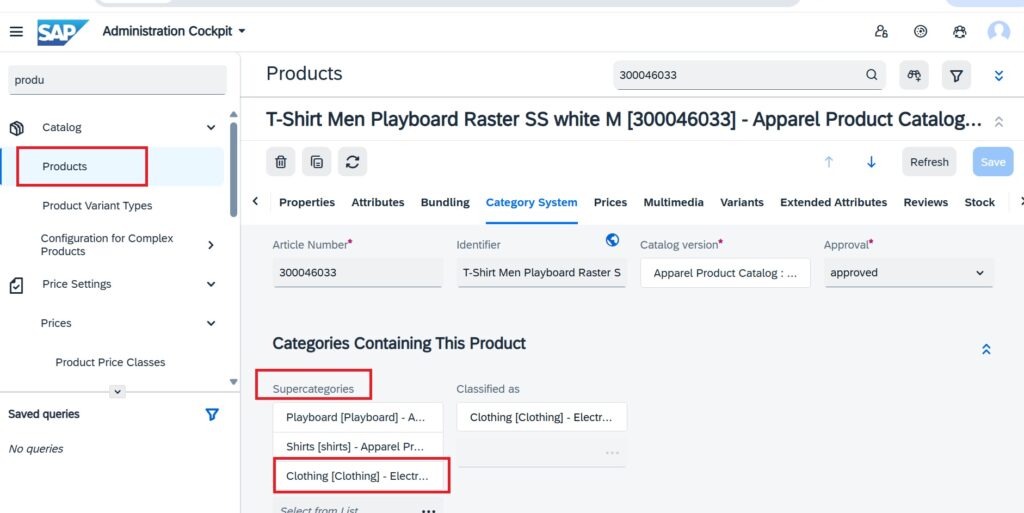
Accessing Features in Java Class
To access classification features in a Java class, you always use ClassificationService, which gives you a FeatureList for a product.
@Autowired
private ClassificationService classificationService;
// Get all features for a product
public void printProductSpecs(ProductModel product) {
    FeatureList featureList = classificationService.getFeatures(product);
    for (Feature feature : featureList.getFeatures()) {
        String name  = feature.getName();
        System.out.println(name);
    }
}
Classification vs Type System
Beginners often get confused between Classification Attributes and regular Hybris Type System Attributes (defined in items.xml). Here is the clearest comparison:
| Feature | Type System Attributes | Classification Attributes |
| Defined in | items.xml (code) | backoffice or impex |
| Requires deployment | Yes | No |
| Can be added at runtime | No | Yes |
| Accessible via Java model | Yes | Only via FeatureList API |
| Good for | Core business logic, price, stock, media | Product specifications, technical details |
| Performance | Fast (direct column) | Slightly slower( Entity-Attribute-Value (EAV) model) |
When to use which?
Use the Type System for core fields that your Java code needs to read directly – like price, stock level, approval status. Use Classification for product specification data that your catalog team manages, that varies by product type, and that doesn’t need direct Java model access.
When NOT to use Classification
Avoid using classification when:
- Attribute is mandatory for all products
- Used heavily in business logic
- Used in frequent database queries