
SAP Hybris Promotion Engine: Complete Guide
Whether you are a beginner stepping into the world of SAP Commerce Cloud (formerly Hybris) or an experienced developer looking to master the underlying architecture, understanding the SAP Hybris Promotion Engine is crucial.
Promotions are the lifeblood of e-commerce marketing. From “Buy 1 Get 1 Free” to “10% off on your first order,” a robust promotion system can make or break a retail business.
This guide covers everything from basic concepts to advanced implementation scenarios.
What is Promotion
SAP Hybris (SAP Commerce) uses promotions as marketing offers to provide customers with benefits such as discounts, free gifts, free shipping, or special deals when they meet specific conditions. Businesses can define these conditions based on factors such as cart value, product quantity, product category, or customer type.
The SAP Commerce Promotion Engine automatically evaluates these conditions and applies the appropriate rewards to the customer’s cart or order. Promotions help businesses increase sales, attract customers, and encourage higher-value purchases through targeted offers.
Key Terminologies in SAP Hybris Promotion Module:
Before diving into promotion implementation, it’s important to understand the core concepts and terminologies used in the SAP Commerce Promotion Engine.
Promotion Engine:
The Promotion Engine is responsible for evaluating all active promotion rules against the customer’s cart or order. When customers satisfy a promotion’s conditions, SAP Hybris automatically applies the corresponding reward.
Promotion Rule:
A Promotion Rule defines the business logic of a promotion. A promotion consists of one or more conditions and actions that determine when it should apply and what reward it should provide.
Condition:
A condition defines the criteria that customers, products, or carts must meet for a promotion to become eligible. Examples include minimum cart value, product quantity, customer group, or product category.
Action:
An action defines the benefit that SAP Hybris provides to the customer when a promotion is triggered. Common rewards include percentage discounts, fixed discounts, free products, and free shipping.
Rule Engine:
The Rule Engine, powered by Drools, processes and executes promotion rules. It evaluates cart data against published rules and determines which promotions are applicable.
Drools:
SAP Commerce uses Drools, a Business Rule Management System (BRMS), to execute rule-based promotions. It enables flexible and scalable promotion management without custom coding.
Promotion Source Rule:
Business users create a Promotion Source Rule in Backoffice to define a promotion. It contains all the information related to conditions, actions, priority, validity period, and other promotion settings.
Coupon:
Customers must enter a coupon code before SAP Commerce can apply a coupon-based promotion. Unlike standard promotions, SAP Commerce does not trigger coupons automatically.
Architecture: How Promotion works internally
1. Cart Update Trigger:
The process starts whenever a customer performs an action that can impact promotions. After a customer modifies the cart, SAP Commerce recalculates all prices, taxes, and totals to keep the cart information up to date. This recalculation ensures that the promotion engine works with the latest cart values rather than stale data.
2. Promotion engine is invoked
After SAP Commerce recalculates the cart, the Promotion Engine evaluates all eligible promotions against the updated cart data. This method acts as the entry point for promotion evaluation. It clears old promotion results and begins a fresh evaluation process.
3. Promotion groups are verified
SAP Commerce does not evaluate every promotion available in the system. Instead, it first determines which Promotion Groups are attached to the current site/catalog. Only promotions belonging to these groups will be evaluated, significantly improving performance in large projects containing thousands of promotions.
4. Active Published rules are loaded
The Promotion Engine retrieves all active and published promotion rules from the Rule Engine module and evaluates only the rules that meet the following criteria:
- Active
- Published
- Within validity period
- Assigned to selected promotion groups
The Promotion Engine completely ignores rules that have expired, remain unpublished, or are disabled.
5. CartModel is converted into RAOs:
This is one of the most important steps in the entire architecture. The Rule Engine cannot directly understand Hybris models such as CartModel, ProductModel. Therefore SAP Commerce converts them into lightweight Rule Action Objects (RAOs). RAOs contain only the information needed by the rule engine, reducing memory usage and improving evaluation speed.
6. RAO Expansion Begins:
After creating the CartRAO, Hybris expands related information that promotions may need. During RAO expansion, SAP Commerce adds data related to product categories, customer groups, and coupons whenever a promotion depends on these attributes. RAO providers and RAO populators handle this expansion process.
7. Facts are Inserted into Drools Session:
SAP Commerce inserts the generated RAOs into a Drools Knowledge Session for rule evaluation. Think of this as loading all cart information into the rule engine’s working memory. At this stage, Drools has everything required to evaluate promotion conditions.
8. Agenda Creation:
When multiple rules match, Drools does not execute them immediately. Instead, matching rules are placed into an internal execution queue called the Agenda. All matching rules may enter the agenda if their conditions are satisfied. The agenda determines the order in which rules will execute.
9. Rule Prioritization:
If several rules are eligible, Drools checks their priority. Higher priority rules are executed first. This mechanism helps businesses control which promotions should take precedence when conflicts occur.
10. Promotion Action Execution:
After a rule successfully fires, Hybris executes the corresponding action. These actions are implemented through action strategies inside the promotion engine. The action calculates the discount amount and prepares promotion result data.
11. PromotionResultModel Creation:
Once an action executes, SAP Commerce creates a PromotionResultModel. This object stores – applied promotion, discount amount, consumed products, action details and promotion status
12. Cart Totals updated:
The discount generated by the promotion action is applied to the cart. The cart is recalculated again to ensure totals remain consistent after promotion application.
13. Storefront receives updated cart:
The updated cart is returned to the storefront through Facades and Commerce Services. The cart page displays all promotion messages generated during evaluation.
Step by step guide to create promotion using OOTB conditions and actions:
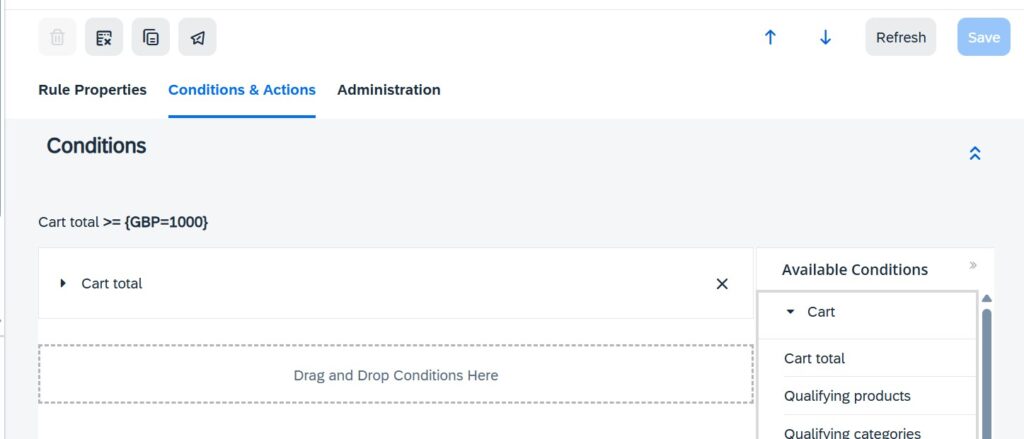
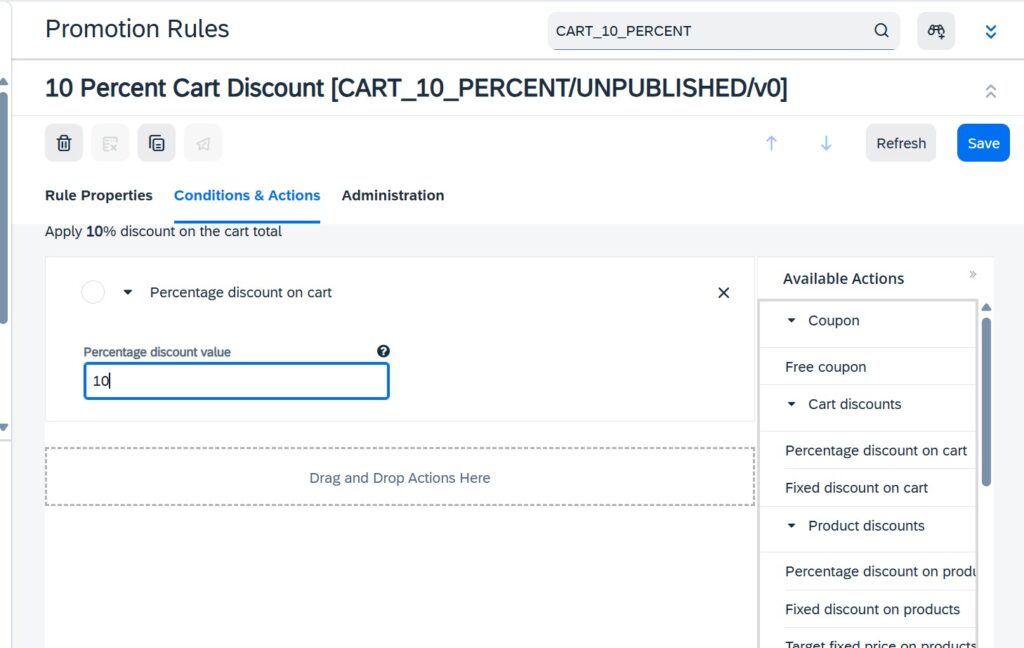
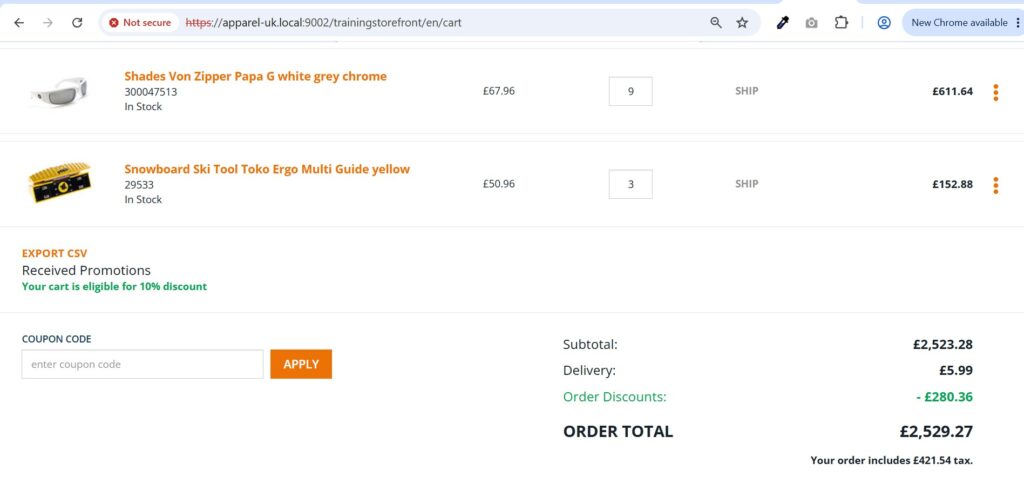
Let’s create a simple promotion – Get 10% discount when cart total exceeds ₹1000.
1. Open backoffice and navigate to Promotion Rules.
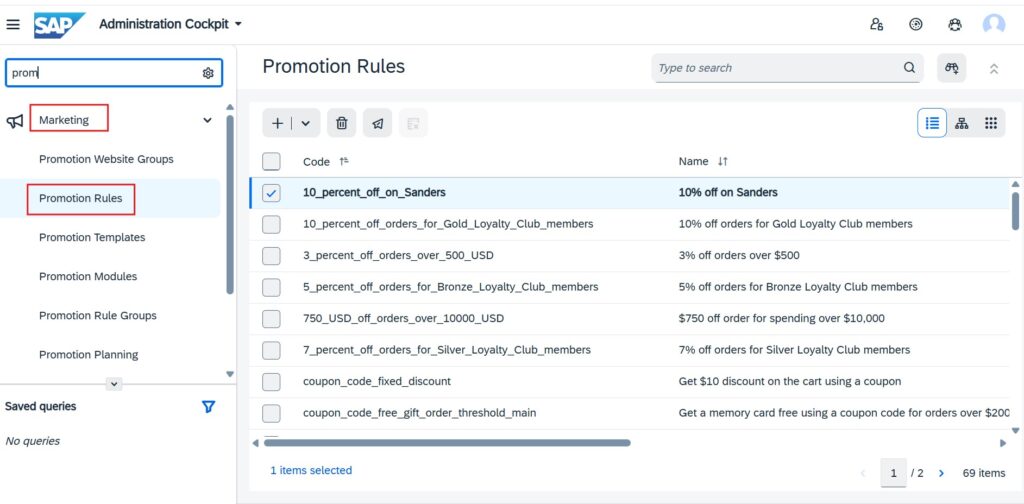
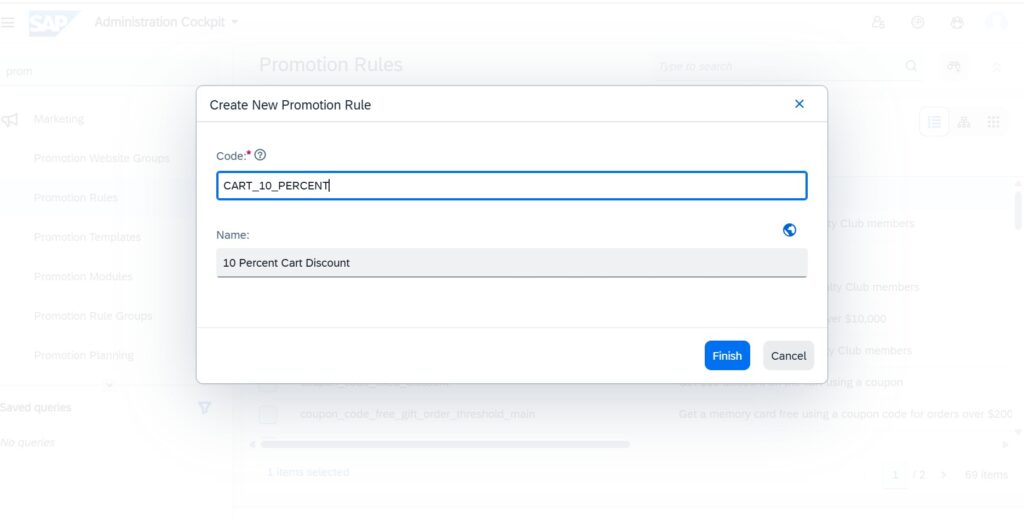
2. Create a new promotion rule. Click on ‘+’ icon and give basic details of promotion.
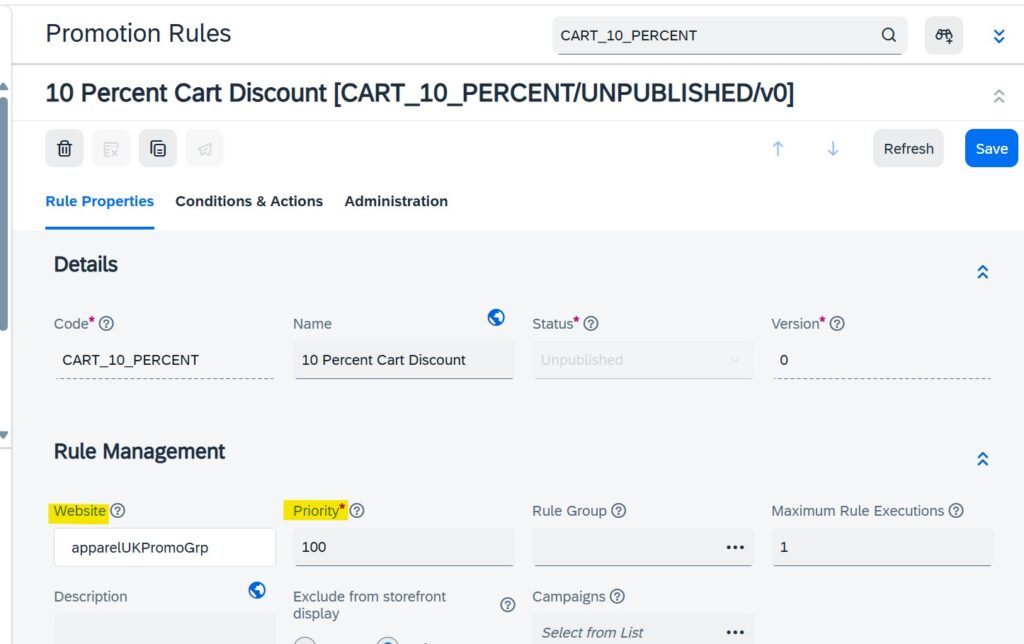
3. Add important details of promotion like priority, website, promotion group.
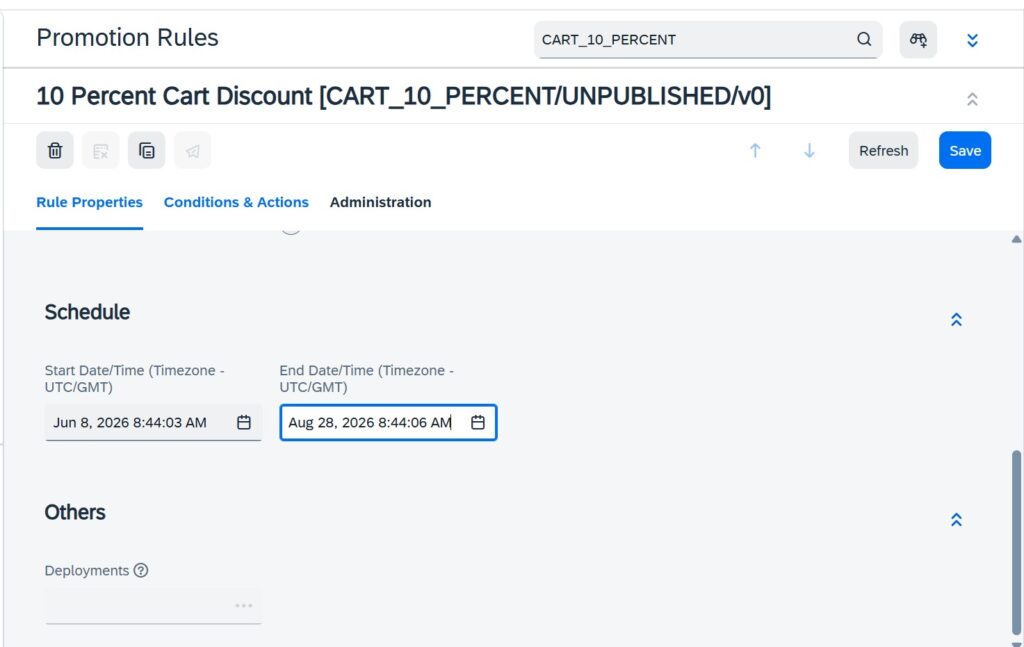
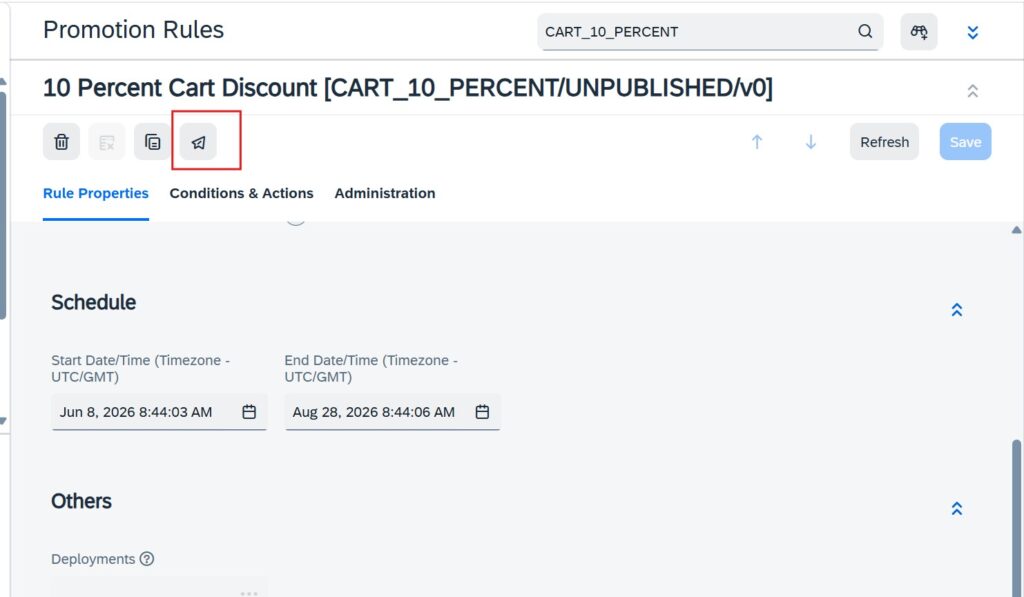
4. Configure validity time – start date and end date.
5. Configure rule conditions.
6. Configure rule action.
7. Save and publish promotion.
8. Test in storefront
In this article, we created a promotion using out-of-the-box (OOTB) conditions and actions. However, business requirements often demand custom conditions and actions that the standard promotion engine does not provide. In the next article, we will explore how to create and implement custom promotion conditions and actions in SAP Commerce.
I hope this article helped you understand the SAP Commerce Promotion Engine. If you have any questions, suggestions, or need clarification on any topic, feel free to leave a comment below. I’ll be happy to help.