
SAP Hybris promotion customization: Step by step guide
One of the biggest advantages of the SAP Commerce (Hybris) Promotion Engine is its flexibility. Although SAP provides many out-of-the-box (OOTB) promotion conditions and actions, businesses often require custom logic to meet real-world requirements that standard promotion rules cannot support.
While so far, we have learned how to create promotions using out-of-the-box (OOTB) conditions. In this comprehensive guide, we will walk through how to create a Custom Promotion Condition from scratch.
STEP BY STEP GUIDE TO CREATE CUSTOM CONDITION:
Requirement: The promotion should apply only when the customer adds a product from the TOKO brand to the cart.
STEP 1: Define the Condition Definition
RuleConditionDefinition: This Impex creates the condition definition that will be displayed in the Promotion Rule Builder. As a result, it tells SAP Commerce that a new condition is available for use when creating promotions.
INSERT_UPDATE RuleConditionDefinition; id[unique=true]; name[lang=en]; priority; translatorId;categories(id)
                                     ;productsFromBrandCondition;Products From Brand;100; productsFromBrandConditionTranslator;cart
STEP 2: Configure the Condition Parameters
RuleConditionDefinitionParameter: This Impex defines the parameters that business users can configure when using the condition.
INSERT_UPDATE RuleConditionDefinitionParameter;definition(id)[unique=true];id[unique=true];priority;name[lang=en];description[lang=en];type;value;required[default=true];validators
;productsFromBrandCondition;brand;1000;Brand;Brand Name;java.lang.String;;false;
STEP 3: Map custom condition to specific rule type
RuleConditionDefinitionRuleTypeMapping: This mapping ensures that the condition is available for the appropriate rule type. Without this mapping, SAP Commerce creates the condition definition but does not allow users to use it when creating promotion rules.
INSERT_UPDATE RuleConditionDefinitionRuleTypeMapping;definition(id)[unique=true];ruleType(code)[default=AbstractRule][unique=true]
;productsFromBrandCondition;
STEP 4: Implement the Condition Translator
The translator translates the defined condition parameters into a Drools Intermediate Representation (IR) tree that inspects cart entries. Create a ProductsBrandConditionTranslator java class and implement the RuleConditionTranslator interface to translate the custom condition into a rule that the Promotion Engine can evaluate.
public class ProductsBrandConditionTranslator implements RuleConditionTranslator
{
	@Override
	public RuleIrCondition translate(final RuleCompilerContext context, final RuleConditionData condition,
			final RuleConditionDefinitionData definition)
	{
		final RuleIrAttributeCondition brandCondition = new RuleIrAttributeCondition();
		brandCondition.setVariable(context.generateVariable(FreeProductRAO.class));
		brandCondition.setAttribute("brand");
		brandCondition.setOperator(RuleIrAttributeOperator.EQUAL);
		final String brand = condition.getParameters().get("brand").getValue();
		brandCondition.setValue(brand);
		return brandCondition;
	}
}
STEP 5: Register the translator bean in *-spring.xml file
<bean id="productsBrandConditionTranslator" class="org.training.core.condition.translator.ProductsBrandConditionTranslator"/>STEP 6: build the system and start the server
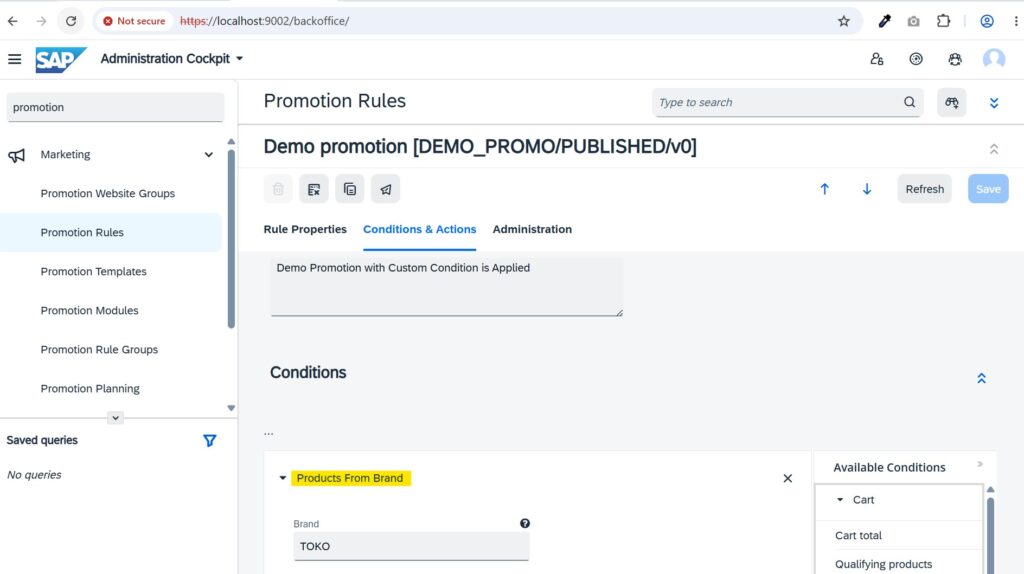
STEP 7: Create a promotion in backoffice using custom condition
To know more about how to create a promotion, refer promotion engine.
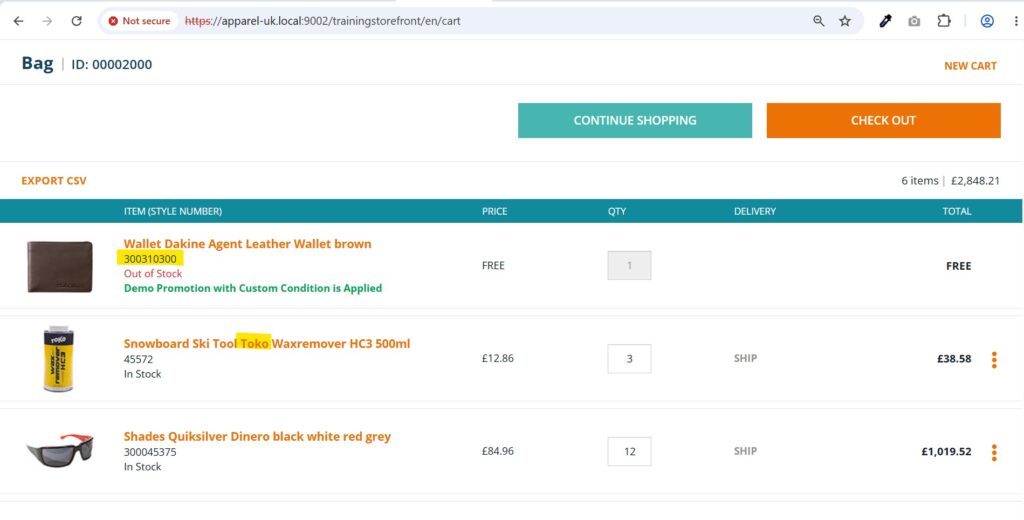
STEP 8: Test in storefront
In the promotion , we specified the brand name as TOKO. When a product belonging to the TOKO brand was added to the cart, the free product 300310300 was automatically added as part of the promotion.
I hope this article helped you understand How to create custom condition in SAP Hybris Promotion Engine. If you have any questions, suggestions, or need clarification on any topic, feel free to leave a comment below. I’ll be happy to help.
<pre class="language-xml"><code>
</code></pre>